Scheduling lives at the foot of the same Send dialog you send from — Send now and “send Monday at 9” are the same decision with a different answer, so they sit together rather than in separate places.
Queueing a send
- 1Open Send on the survey card in My Surveys
Add your recipients first if the list is empty — a scheduled send goes to whoever is on the list when it fires.
- 2Scroll to Scheduled sends and click Schedule a send
- 3Choose Invites or Reminder
Invites go to everyone who has not been invited yet. Reminder goes only to people who have not responded, under the same rules as sending one by hand: two per person, at least 24 hours apart.
- 4Pick the date, the time, and the time zone
The zone defaults to your own. Set it to the audience's zone when that is what you mean — “9am” to a list in Berlin is a different instant from 9am where you are sitting.
- 5Click Schedule it
It appears in the list as Queued, showing the time in the zone you picked.
The scheduling form
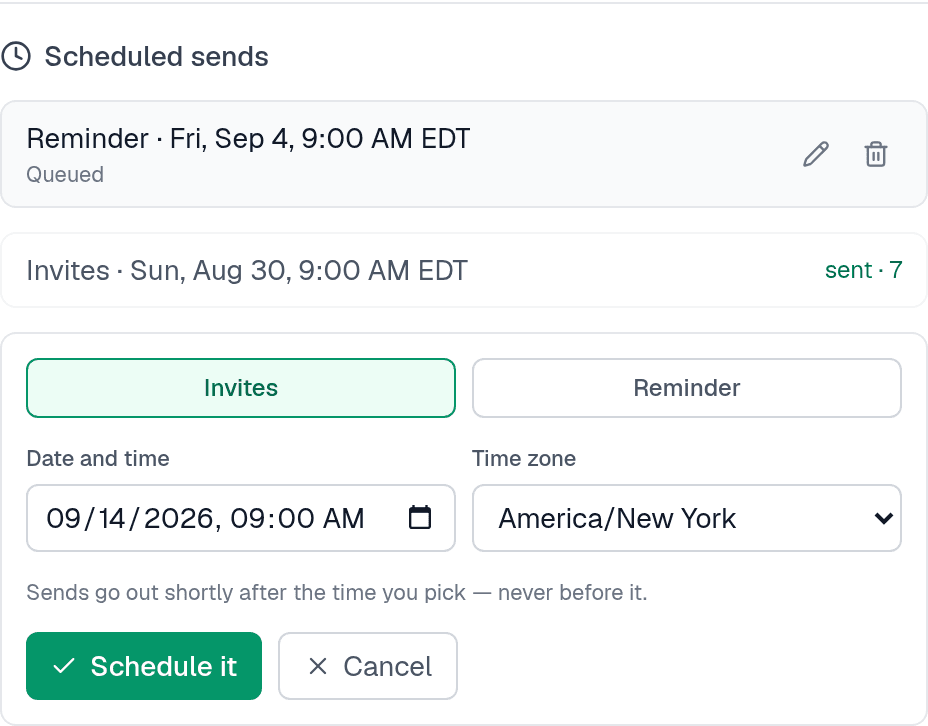
A queued send fires shortly after its time, never before — usually within about fifteen minutes. If you need something to land exactly on the hour, schedule it for the hour and let it arrive a few minutes past.
Daylight saving cannot move it. The moment you schedule, the exact instant is pinned, so 9am on a date after a clock change is still the 9am you meant.
Changing your mind
A queued send has a pencil and a bin next to it. The pencil reschedules it; the bin cancels it. Both stay available right up until it starts sending.
Once sending begins the row locks, and that is deliberate: mail is going out person by person, and stopping halfway would leave some of your list invited and the rest not, with no way to tell you which. The lock only lasts for the run itself.
What the list tells you
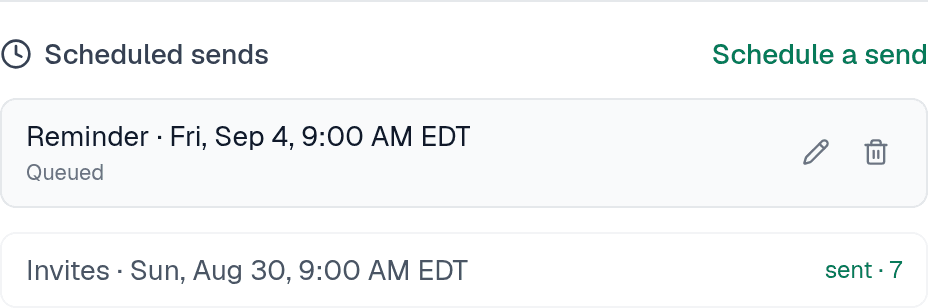
The states a scheduled send passes through
| Shows as | Means |
|---|---|
| Queued | Waiting for its time. This is the only state you can reschedule or cancel. |
| Sending now | Going out. It cannot be changed from here. |
| sent · N | Done, and N people were emailed. |
| canceled | You cancelled it before it fired. Nothing was sent. |
| didn't send | Something stopped it, with the reason shown underneath. Nothing partial is hidden — if some mail went out before it stopped, the count says so. |
Things that will stop a scheduled send
All of these are checked when it fires, not when you queue it — so a survey that is ready now can still fail later if something changes.
- The survey is not published, or has closed — Invites to an unpublished survey land on an error page, and invites to a closed one land on its closing page, so the send is refused instead. The form warns you at the time you schedule if the survey is still a draft.
- Nobody is on the list — Add recipients before the send fires. The list is read at that moment, so people you add in the meantime are included.
- It would cross your monthly sending limit — 5,000 emails per account per month, shared with password resets and verification mail.
- It is more than a day overdue — If something was wrong with the scheduler for a long stretch, a send that is over 24 hours late is failed rather than fired. A three-day-old invite blast going out unannounced is a surprise, not a recovery — you decide whether to re-send.
A scheduled invite skips anyone already invited, and a scheduled reminder skips anyone who has responded, bounced or unsubscribed. That holds even if a send is interrupted and picked up again — the people already emailed are stamped and passed over.
So it is safe to queue invites and then add more recipients: the queued send simply picks up whoever is new.
How many you can queue
Up to 10 pending sends per survey. Cancel one to make room for another. Sends that have already gone do not count against it, and you can schedule up to a year ahead.
Anyone who can edit the survey — the owner or an editor. Viewers cannot schedule, cancel or reschedule a send, the same as they cannot send one by hand.